Your homepage loads. Three seconds pass. Then four. A potential customer clicks the back button and picks a competitor. That’s not hypothetical; it happens thousands of times a day across the web, and most business owners never see it coming because they’re not the ones waiting.
Page speed is one of those problems that’s invisible from the inside but brutal from the outside. If your website is slow, Google notices, visitors notice, and your revenue feels it. The good news is that most speed problems are fixable, and fixing them doesn’t require rebuilding your site from scratch.
GOA-TECH, a Miami-based digital agency covering web design, SEO, and IT services, works with clients across industries to identify and resolve exactly these kinds of performance issues. This article walks through what slows sites down, what actually matters when you audit and optimize, and when it’s worth bringing in professional help.
 Why Site Speed Affects Your SEO and Core Web Vitals
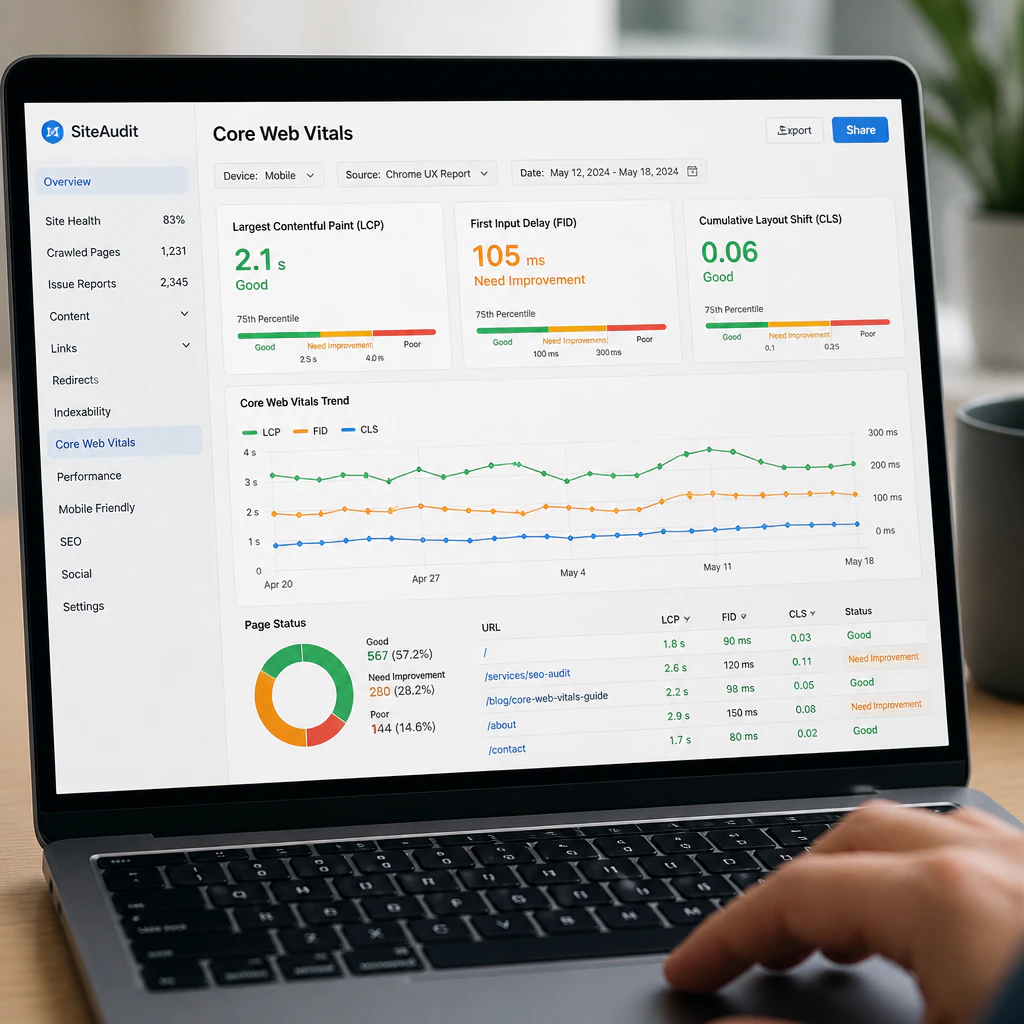
One thing that many business owners don’t understand until it hits them in the pocketbook is that a slow website has an effect on your rankings, not just on your customers. Since 2021, Core Web Vitals have been one of the ranking signals Google uses. Loading time, visual stability, and interactivity, once considered “solely a user experience problem”, are now all measured and scored by Google.
Specifically, Google measures Largest Contentful Paint (LCP, which is the time it takes for the main content on a page to load), Interaction to Next Paint (INP, how fast your site responds to input), and Cumulative Layout Shift (CLS, the visual stability of your content over time). A slow website will score poorly on all three, and these scores will be reflected in your rankings.
Amazon famously found that every 100 milliseconds of latency cost them 1% in sales. Google’s own research on mobile page speed shows that bounce rates rise by 123% when page load time goes from 1 second to 10 seconds. Slow means frustration, and frustration costs money.
Reading Your Google PageSpeed Report
If you haven’t already, you should run your website through Google PageSpeed Insights. The tool uses real Chrome data to give you a score based on the speed of your site on both desktop and mobile. Your score here also reflects real-world data collected directly from Google about your Core Web Vitals.
PageSpeed Insights will show you exactly where to spend your time fixing things that are slowing down your website. Some of the more common offenders in WordPress are render-blocking resources, uncompressed images, unused JavaScript, and slow server response times. Each issue is listed with an estimated time savings, which helps you understand the impact of resolving it. You should tackle the issues that matter most for LCP first. It’s tempting to chase a perfect 100, but there’s no need. A site in the 70s/80s with good CWV will beat a site in the 30s/40s.
WordPress Speed: Where Plugins and Hosting Slow You Down
According to W3Techs, WordPress powers 43% of the entire internet. Which means most of the sites that need speed work done are WordPress sites. The platform is really flexible and can do many things, but it’s also quite easy to make your site slow without ever being aware of it!
The most likely culprits on a WordPress site are:
- Bloated plugins. When you add a plugin to WordPress, all the code it adds runs on every page load, and some of the most widely-used plugins are really badly optimized. Furthermore, plugins may also conflict with each other, generating redundant requests and error handling that add to the load time without making much noise until you really go digging into it.
- Unoptimized images. Many photos pulled directly from your camera or from stock image services will range from 3-5 MB. The ideal photo for the web should be closer to 100 KB. You can dramatically reduce the size of your page loads by converting your images to WebP format and properly compressing them; sometimes you can see a reduction in your page weight by more than 50%!
- No caching layer. Without a caching layer, WordPress will build every single page from the database every time a user visits your site. A good cache plugin will save these as static HTML, reducing load on the server and shaving a lot of time off your response time.
- Bad hosting. Your server sets the baseline for your maximum website performance, and many low-cost shared hosts have a TTFB (time to first byte) so slow that nothing you do to optimize the frontend can really make it much faster.
Of course, WooCommerce sites have an extra complication, since cart and checkout pages usually aren’t cached due to their personalized and dynamic nature. This means you really must have your server optimized for that if you expect fast checkout pages.
 Optimization Techniques That Actually Improve Performance
Image optimization and caching are the big ticket items on most sites, but there are a few other techniques that are consistently worth considering.
Minification is the process of removing extraneous whitespace, comments, and unnecessary code to decrease the file sizes of your CSS, JavaScript, and HTML. Your site will work exactly the same! Caching plugins usually include this as part of their services.
Lazy loading means that images (and videos) below the fold don’t start loading until the user is actually scrolling down to them. This helps improve LCP because the browser knows it can concentrate on above-the-fold content first. Lazy loading has been a native WordPress capability since version 5.5!
A content delivery network (CDN) distributes your assets (images, scripts, and CSS) to multiple data centers. If your Chicago user is loading your images and scripts from a CDN node in Chicago, it can make a big difference compared to all those files sitting in Miami! Furthermore, your origin server has less work to do delivering static assets to users.
Older WordPress sites, in particular, benefit from routine database cleanup. Drafts, spam comments, post revisions, and leftover transient data can silently build up over time and slow down database queries in increasingly compounded ways. A regular cleanup can be a game-changer.
What a Real Website Performance Audit Involves
Running Google PageSpeed Insights once does not constitute a full audit; it merely sets you off on the right track. A comprehensive performance audit assesses server response time, the volume and size of every network request, render-blocking resources, third-party scripts (analytics tags, chat widgets, ads, and others), mobile vs. desktop performance, and more.
Tools like GTmetrix and WebPageTest include waterfall diagrams, which clearly point to bottlenecks in a way that summary scores may not. You can see exactly which resources are delaying the first paint, how many requests are needed before the page becomes usable, and whether one particular third-party script is holding the rest hostage.
In fact, this is precisely where professional help pays for itself. Running the diagnostic isn’t the challenge; anyone can get a report. What you really need is the experience to know what to do with the results: which plugins to replace, which ones just need tweaking, when to recommend hosting changes or simply an upgrade, how to make improvements that don’t break something else, and the rest.
When to Hire a Website Speed Optimization Service
If your site scores below 50 on Google PageSpeed Insights, takes more than three seconds to load on mobile, or is consistently showing failing Core Web Vitals in Google Search Console, then fiddling with a plugin or two is unlikely to improve your situation. That is when you should seriously consider bringing in someone experienced to optimize your site.
At GOA-TECH in Miami, this work is part of their broader SEO and web design services, and that is important. Optimization fixes that alter page layouts or conflict with conversion tracking codes just swap one problem for another. Getting the same team to handle optimization and ongoing site maintenance means changes get coordinated.
Image optimization, caching, minification, lazy loading, a CDN, and a clean database all compound on each other, which is why audits and ongoing optimization work better as a coordinated process than as one-off fixes.
For businesses with large WordPress or WooCommerce sites, the cost-benefit analysis is not even a contest: Faster sites convert better, rank better, and keep visitors engaged longer. If your site is slow, that is a solvable problem with a clear financial cost. Contact GOA-TECH for a free consultation to see what you can do.